

Your graphics add a nice touch to my presentations and I recently used them for one of my all-hands meetings. Your toolbox adds professionalism to my slides. Instead of using standard clipart.
Claude Jones, Director of Engineer, @Walmartlabs, USA

Your graphics add a nice touch to my presentations and I recently used them for one of my all-hands meetings. Your toolbox adds professionalism to my slides. Instead of using standard clipart.
Claude Jones, Director of Engineer, @Walmartlabs, USA
I needed a fresh look at some of my slides. I've tried to find a way to create a paintbrush effect, to underline, accentuate, add some color and the handwritten markers were just the things. Very easy to use, easy to size, change the color. It was an affordable, perfect solution and I'm happy to recommend it.
Anonymous, US
The crisp, clean look of the graphics, and the fact that it allowed me to easily edit and change the colors to match the template was my main reason for purchasing them.
Brandie Jenkins, E-learning Developer, USA
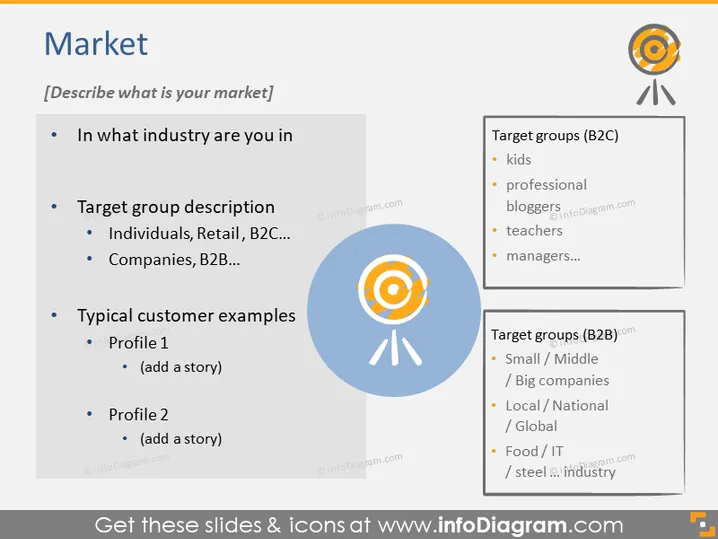
Die PowerPoint-Folie mit dem Titel "Markt" fordert den Präsentierenden auf, seinen Marktbereich zu beschreiben. Sie stellt Fragen wie "In welcher Branche sind Sie tätig?", um den Industriesektor zu identifizieren. "Zielgruppenschreibung" erkundet, wer die Kunden sein könnten, mit Unterpunkten wie "Einzelpersonen, Einzelhandel, B2C...", die klarstellen, dass diese Zielgruppen alltägliche Verbraucher oder andere Unternehmen wie "Unternehmen, B2B..." sein können. "Typische Kundenbeispiele" ermutigt zur Präsentation von Kundenprofilen und schlägt vor, eine Erzählung hinzuzufügen – "eine Geschichte hinzufügen" – um Kontext oder spezifische Beispiele zu liefern. Die rechte Seite der Folie listet potenzielle "Zielgruppen (B2C)" wie Kinder und Lehrer sowie "Zielgruppen (B2B)" wie "Kleine / Mittlere / Große Unternehmen".



