
Your graphics add a nice touch to my presentations and I recently used them for one of my all-hands meetings. Your toolbox adds professionalism to my slides. Instead of using standard clipart.
Claude Jones, Director of Engineer, @Walmartlabs, USA

Your graphics add a nice touch to my presentations and I recently used them for one of my all-hands meetings. Your toolbox adds professionalism to my slides. Instead of using standard clipart.
Claude Jones, Director of Engineer, @Walmartlabs, USA
I needed a fresh look at some of my slides. I've tried to find a way to create a paintbrush effect, to underline, accentuate, add some color and the handwritten markers were just the things. Very easy to use, easy to size, change the color. It was an affordable, perfect solution and I'm happy to recommend it.
Anonymous, US
The crisp, clean look of the graphics, and the fact that it allowed me to easily edit and change the colors to match the template was my main reason for purchasing them.
Brandie Jenkins, E-learning Developer, USA
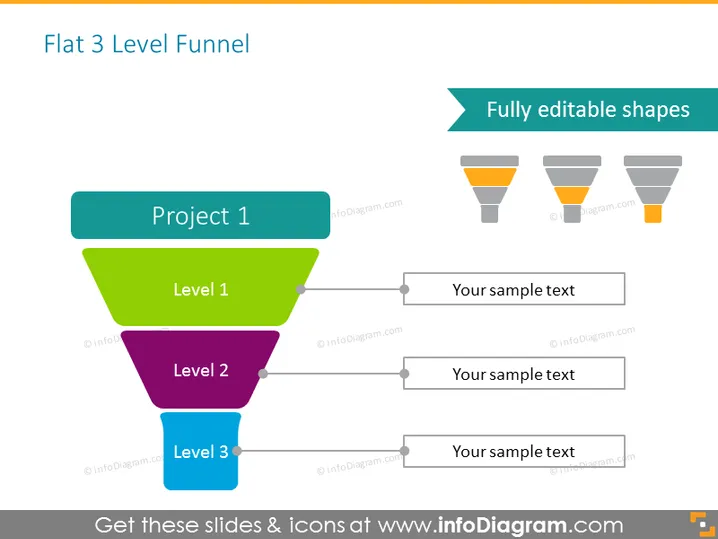
Die Folie präsentiert ein Diagramm "Flacher 3-Stufen-Trichter", das typischerweise verwendet wird, um einen Prozess darzustellen, der durch verschiedene Stufen gefiltert wird. "Stufe 1" ist in grün dargestellt, was auf eine Anfangsphase oder die breiteste Kategorie hinweisen könnte. "Stufe 2" ist in lila, was auf eine Fortschreitung oder einen engeren Segment hinweist. "Stufe 3" ist in blau dargestellt, was wahrscheinlich die finale Phase oder die am gezieltesten Untergruppe repräsentiert. Neben jeder Trichterstufe gibt es Platzhaltertexte, die andeuten, dass Details oder Erklärungen entsprechend jeder Stufe eingefügt werden können.
Die Folie verwendet ein sauberes und minimalistisches Design, wobei eine farbcodierte Darstellung die visuelle Trennung der Stufen verbessert. Jedes Teil des Trichters entspricht einem Textabschnitt und schafft einen organisierten Informationsfluss.