
Your graphics add a nice touch to my presentations and I recently used them for one of my all-hands meetings. Your toolbox adds professionalism to my slides. Instead of using standard clipart.
Claude Jones, Director of Engineer, @Walmartlabs, USA
Your graphics add a nice touch to my presentations and I recently used them for one of my all-hands meetings. Your toolbox adds professionalism to my slides. Instead of using standard clipart.
Claude Jones, Director of Engineer, @Walmartlabs, USA
I needed a fresh look at some of my slides. I've tried to find a way to create a paintbrush effect, to underline, accentuate, add some color and the handwritten markers were just the things. Very easy to use, easy to size, change the color. It was an affordable, perfect solution and I'm happy to recommend it.
Anonymous, US
The crisp, clean look of the graphics, and the fact that it allowed me to easily edit and change the colors to match the template was my main reason for purchasing them.
Brandie Jenkins, E-learning Developer, USA
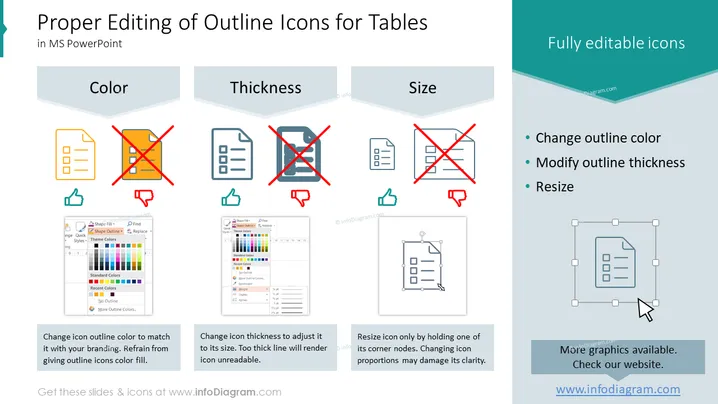
Die Folie ist darauf ausgelegt, die Benutzer über die richtigen Methoden zum Bearbeiten von Umriss-Icons in Microsoft PowerPoint aufzuklären, mit einem Schwerpunkt auf Tabellen. Sie weist auf drei wichtige Aspekte hin: Farbe, Dicke und Größe.
Die Folie hat ein sauberes und professionelles Aussehen mit einem hellblauen und weißen Farbschema, das sie visuell ansprechend und leicht verständlich macht. Der Einsatz von rot und grün zur Farbcodierung kommuniziert effektiv korrekte versus inkorrekte Praktiken.




