
Your graphics add a nice touch to my presentations and I recently used them for one of my all-hands meetings. Your toolbox adds professionalism to my slides. Instead of using standard clipart.
Claude Jones, Director of Engineer, @Walmartlabs, USA
Your graphics add a nice touch to my presentations and I recently used them for one of my all-hands meetings. Your toolbox adds professionalism to my slides. Instead of using standard clipart.
Claude Jones, Director of Engineer, @Walmartlabs, USA
I needed a fresh look at some of my slides. I've tried to find a way to create a paintbrush effect, to underline, accentuate, add some color and the handwritten markers were just the things. Very easy to use, easy to size, change the color. It was an affordable, perfect solution and I'm happy to recommend it.
Anonymous, US
The crisp, clean look of the graphics, and the fact that it allowed me to easily edit and change the colors to match the template was my main reason for purchasing them.
Brandie Jenkins, E-learning Developer, USA
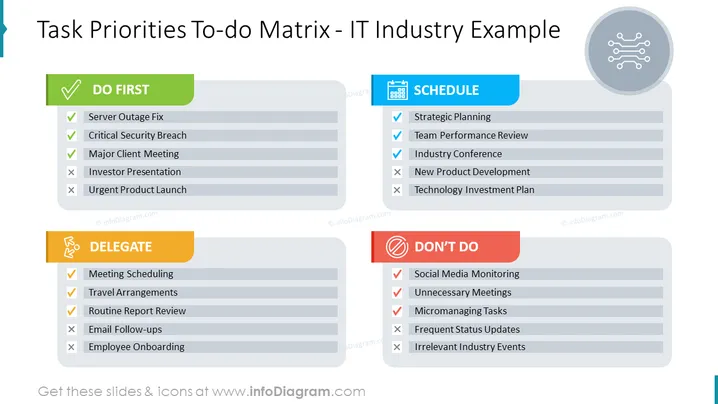
Die Folie zeigt eine Matrix, die Aufgaben nach ihrem Prioritätsniveau kategorisiert, speziell angepasst für die IT-Branche. Die Kategorie "ZUERST MACHEN" umfasst dringende und kritische Aufgaben wie Serverausfallbehebung, kritische Sicherheitsverletzung und wichtiges Kundengespräch. Dies sind Aufgaben, die als entscheidend für sofortige Aufmerksamkeit gelten. "DELEGIEREN" besteht aus Aufgaben wie Besprechungsplanung, Reisevorbereitungen und Überprüfung von Routineberichten, die wichtig sind, aber an andere delegiert werden können. Die Kategorie "TERMINE" ist für wichtige, aber nicht dringende Punkte wie Strategische Planung und Teamleistungsevaluierung gedacht, die eine geplante Ausführung erfordern. Schließlich umfasst "NICHT MACHEN" Aufgaben, die als geringprioritär oder unnötig angesehen werden, wie Social-Media-Überwachung und unnötige Besprechungen, die minimiert oder eliminiert werden sollten.
Das Gesamterscheinungsbild der Folie ist klar und professionell, mit einem Farbschema, um die Kategorien visuell zu unterscheiden. Die Verwendung von Symbolen und Häkchen/x-Marken verbessert das Verständnis des Status der Aufgaben auf einen Blick.




