

Your graphics add a nice touch to my presentations and I recently used them for one of my all-hands meetings. Your toolbox adds professionalism to my slides. Instead of using standard clipart.
Claude Jones, Director of Engineer, @Walmartlabs, USA

Your graphics add a nice touch to my presentations and I recently used them for one of my all-hands meetings. Your toolbox adds professionalism to my slides. Instead of using standard clipart.
Claude Jones, Director of Engineer, @Walmartlabs, USA
I needed a fresh look at some of my slides. I've tried to find a way to create a paintbrush effect, to underline, accentuate, add some color and the handwritten markers were just the things. Very easy to use, easy to size, change the color. It was an affordable, perfect solution and I'm happy to recommend it.
Anonymous, US
The crisp, clean look of the graphics, and the fact that it allowed me to easily edit and change the colors to match the template was my main reason for purchasing them.
Brandie Jenkins, E-learning Developer, USA
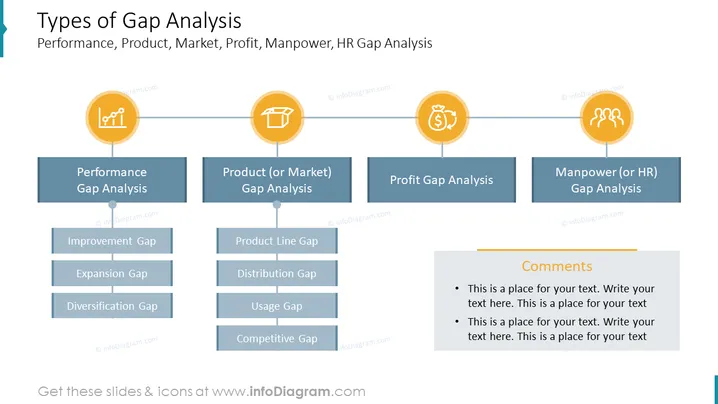
Die PowerPoint-Folie behandelt die verschiedenen Arten der Gap-Analyse, einschließlich Leistungs-Gap-Analyse, Produkt- (oder Markt-) Gap-Analyse, Gewinn-Gap-Analyse und Personal- (oder HR-) Gap-Analyse. Die Leistungs-Gap-Analyse wird verwendet, um Bereiche zu identifizieren, in denen die Leistung eines Unternehmens die Erwartungen nicht erfüllt. Die Produkt- (oder Markt-) Gap-Analyse wird verwendet, um Lücken im Produkt- oder Marktangebot eines Unternehmens zu identifizieren. Die Gewinn-Gap-Analyse wird verwendet, um Bereiche zu identifizieren, in denen die Gewinne eines Unternehmens die Erwartungen nicht erfüllen. Die Personal- (oder HR-) Gap-Analyse wird verwendet, um Lücken in der Belegschaft und den Personaleinstellungen eines Unternehmens zu identifizieren.
Die Folie ist gut organisiert und visuell ansprechend. Der Titel der Folie ist klar und prägnant, und die verschiedenen Arten der Gap-Analyse sind in einer logischen Reihenfolge angeordnet. Der Einsatz von Formen, Farben und Symbolen trägt dazu bei, die Folie visuell interessant und leicht verständlich zu gestalten.



