

Your graphics add a nice touch to my presentations and I recently used them for one of my all-hands meetings. Your toolbox adds professionalism to my slides. Instead of using standard clipart.
Claude Jones, Director of Engineer, @Walmartlabs, USA

Your graphics add a nice touch to my presentations and I recently used them for one of my all-hands meetings. Your toolbox adds professionalism to my slides. Instead of using standard clipart.
Claude Jones, Director of Engineer, @Walmartlabs, USA
I needed a fresh look at some of my slides. I've tried to find a way to create a paintbrush effect, to underline, accentuate, add some color and the handwritten markers were just the things. Very easy to use, easy to size, change the color. It was an affordable, perfect solution and I'm happy to recommend it.
Anonymous, US
The crisp, clean look of the graphics, and the fact that it allowed me to easily edit and change the colors to match the template was my main reason for purchasing them.
Brandie Jenkins, E-learning Developer, USA
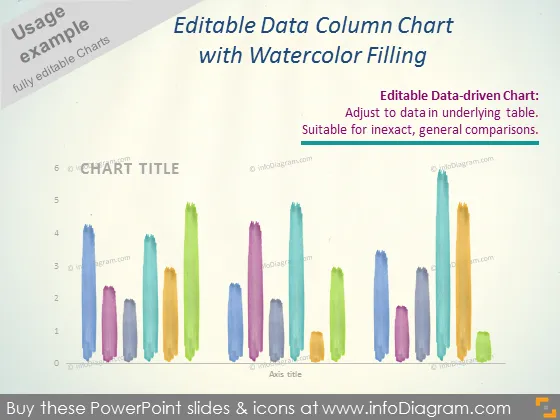
Die PowerPoint-Folie zeigt ein "Editierbares Daten-Säulendiagramm mit Aquarellfüllung", das sich zur Darstellung ungenauer, allgemeiner Vergleiche eignet. Es handelt sich um ein datengestütztes Diagramm, was bedeutet, dass Sie die Werte des Diagramms ändern können, indem Sie die Daten in einer zugrunde liegenden Tabelle anpassen. Die Säulen simulieren eine Aquarelltextur und verleihen dem Diagramm eine künstlerische und einzigartige Ästhetik im Vergleich zu typischen Daten-Diagrammen in einfarbiger Darstellung. Die Folie betont, dass die visuelle Anziehungskraft des Diagramms dessen Fähigkeit, Informationen effektiv zu vermitteln, nicht beeinträchtigt.
Das Gesamtbild der Folie ist künstlerisch dank der Aquarelltextur der Säulen. Das Design vereint visuelle Kreativität mit funktionaler Datenpräsentation.



