
Your graphics add a nice touch to my presentations and I recently used them for one of my all-hands meetings. Your toolbox adds professionalism to my slides. Instead of using standard clipart.
Claude Jones, Director of Engineer, @Walmartlabs, USA
Your graphics add a nice touch to my presentations and I recently used them for one of my all-hands meetings. Your toolbox adds professionalism to my slides. Instead of using standard clipart.
Claude Jones, Director of Engineer, @Walmartlabs, USA
I needed a fresh look at some of my slides. I've tried to find a way to create a paintbrush effect, to underline, accentuate, add some color and the handwritten markers were just the things. Very easy to use, easy to size, change the color. It was an affordable, perfect solution and I'm happy to recommend it.
Anonymous, US
The crisp, clean look of the graphics, and the fact that it allowed me to easily edit and change the colors to match the template was my main reason for purchasing them.
Brandie Jenkins, E-learning Developer, USA
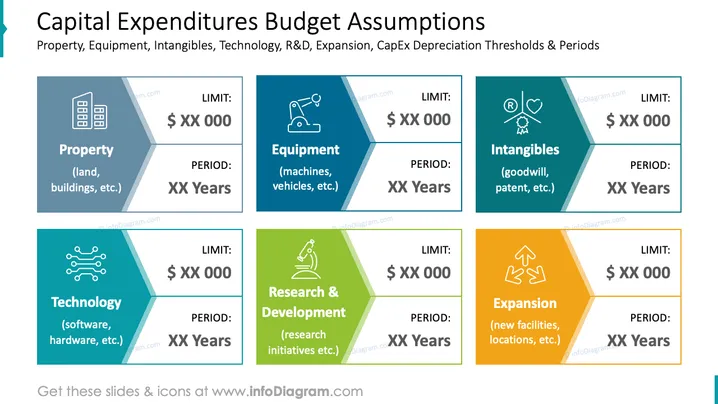
Die PowerPoint-Folie zeigt die Budgetannahmen für verschiedene Kategorien von Investitionen: Sachanlagen, Ausrüstung, immaterielle Vermögenswerte, Technologie, Forschung & Entwicklung und Expansion. Jede Kategorie wird von zwei Informationen begleitet: einem finanziellen „LIMIT“ und einer betrieblichen „PERIODE“. „Sachanlagen“ bezieht sich auf Vermögenswerte wie Grundstücke und Gebäude, „Ausrüstung“ auf Gegenstände wie Maschinen und Fahrzeuge, „Immaterielle Vermögenswerte“ umfasst Vermögenswerte wie Goodwill und Patente, „Technologie“ bezieht sich auf Software und Hardware, „Forschung & Entwicklung“ umfasst Forschungsinitiativen und „Expansion“ beinhaltet den Erwerb neuer Einrichtungen oder Standorte.
Die Folie hat eine moderne und geschäftliche Ästhetik mit einem klaren, strukturierten Layout, das ein schnelles Verständnis der Kategorien und der zugehörigen Datenpunkte fördert. Die Verwendung unterschiedlicher Farben hilft, zwischen den Ausgabentypen zu unterscheiden.




