

Your graphics add a nice touch to my presentations and I recently used them for one of my all-hands meetings. Your toolbox adds professionalism to my slides. Instead of using standard clipart.
Claude Jones, Director of Engineer, @Walmartlabs, USA

Your graphics add a nice touch to my presentations and I recently used them for one of my all-hands meetings. Your toolbox adds professionalism to my slides. Instead of using standard clipart.
Claude Jones, Director of Engineer, @Walmartlabs, USA
I needed a fresh look at some of my slides. I've tried to find a way to create a paintbrush effect, to underline, accentuate, add some color and the handwritten markers were just the things. Very easy to use, easy to size, change the color. It was an affordable, perfect solution and I'm happy to recommend it.
Anonymous, US
The crisp, clean look of the graphics, and the fact that it allowed me to easily edit and change the colors to match the template was my main reason for purchasing them.
Brandie Jenkins, E-learning Developer, USA
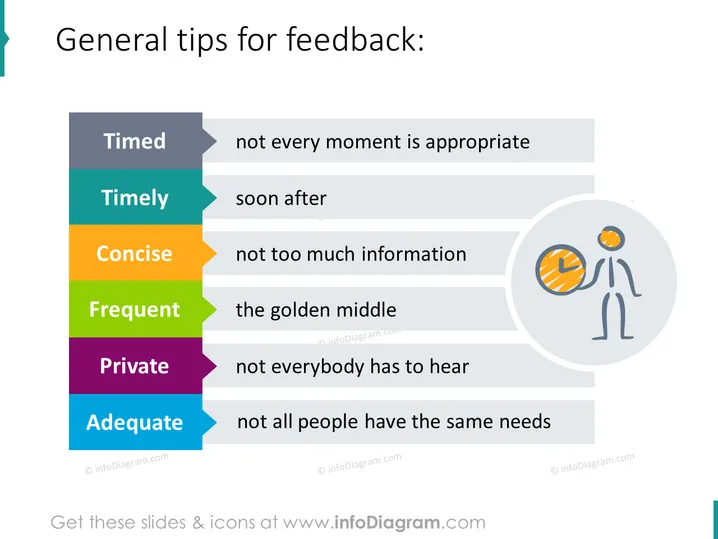
Die PowerPoint-Folie bietet Richtlinien für das Geben von Feedback und betont sechs Schlüsselkonzepte: Zeitlich (nicht jeder Moment ist geeignet), zeitnah (kurz nach dem Ereignis), prägnant (nicht zu viele Informationen), häufig (die goldene Mitte), privat (nicht jeder muss es hören) und angemessen (nicht alle Menschen haben die gleichen Bedürfnisse). Jedes Konzept ist ein Baustein zur Förderung effektiver Kommunikation und weist darauf hin, dass Feedback sorgfältig überlegt, zeitnah übermittelt, klar und auf den Punkt gebracht, angemessen häufig gegeben, diskret geteilt und auf die Anforderungen des Einzelnen zugeschnitten sein sollte.



