

Your graphics add a nice touch to my presentations and I recently used them for one of my all-hands meetings. Your toolbox adds professionalism to my slides. Instead of using standard clipart.
Claude Jones, Director of Engineer, @Walmartlabs, USA

Your graphics add a nice touch to my presentations and I recently used them for one of my all-hands meetings. Your toolbox adds professionalism to my slides. Instead of using standard clipart.
Claude Jones, Director of Engineer, @Walmartlabs, USA
I needed a fresh look at some of my slides. I've tried to find a way to create a paintbrush effect, to underline, accentuate, add some color and the handwritten markers were just the things. Very easy to use, easy to size, change the color. It was an affordable, perfect solution and I'm happy to recommend it.
Anonymous, US
The crisp, clean look of the graphics, and the fact that it allowed me to easily edit and change the colors to match the template was my main reason for purchasing them.
Brandie Jenkins, E-learning Developer, USA
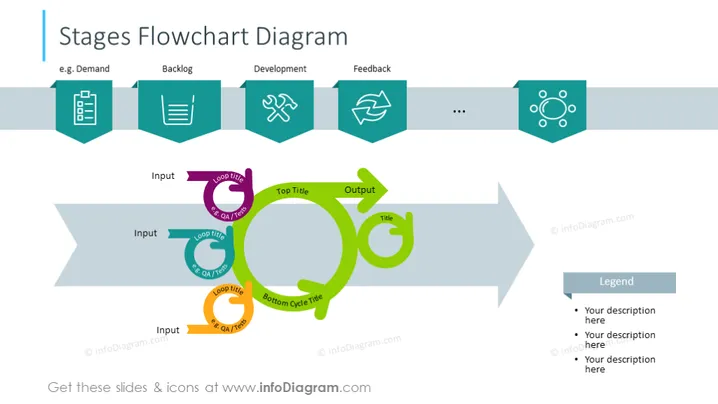
##Foliensatzinhalt: Diese Scrum-Flussdiagramm-Prozess-PowerPoint-Vorlage zeigt uns den Scrum-Workflow mit einem Diagramm. Der erste Schritt ist Nachfrage - für ein bestimmtes Produkt; der nächste Schritt ist Product Backlog - eine Person zuweisen, die an diesem Projekt arbeitet und die Priorität an die oberste Stelle setzen; Entwicklung - dieses Produkt mit agiler Methodik entwickeln; Feedback - die endgültigen Gedanken zu diesem spezifischen Produkt. Diese Scrum-Folie ist einfach zu bearbeiten und an Ihre Bedürfnisse anzupassen. Laden Sie diese Scrum-Prozessfolie in hoher Qualität herunter, die auch mit Google Slides und Keynote kompatibel ist. ##Foliensymbole: Graue Banner, Pfeil-förmiger Banner Vektor, Aufzählungspunkte, Checkliste-Symbol, Hammer- und Schraubenschlüssel-Symbol, Flache Umriss- Symbole, Aktualisieren-Symbol, Farbige Formen, Flussdiagramm



