

Your graphics add a nice touch to my presentations and I recently used them for one of my all-hands meetings. Your toolbox adds professionalism to my slides. Instead of using standard clipart.
Claude Jones, Director of Engineer, @Walmartlabs, USA

Your graphics add a nice touch to my presentations and I recently used them for one of my all-hands meetings. Your toolbox adds professionalism to my slides. Instead of using standard clipart.
Claude Jones, Director of Engineer, @Walmartlabs, USA
I needed a fresh look at some of my slides. I've tried to find a way to create a paintbrush effect, to underline, accentuate, add some color and the handwritten markers were just the things. Very easy to use, easy to size, change the color. It was an affordable, perfect solution and I'm happy to recommend it.
Anonymous, US
The crisp, clean look of the graphics, and the fact that it allowed me to easily edit and change the colors to match the template was my main reason for purchasing them.
Brandie Jenkins, E-learning Developer, USA
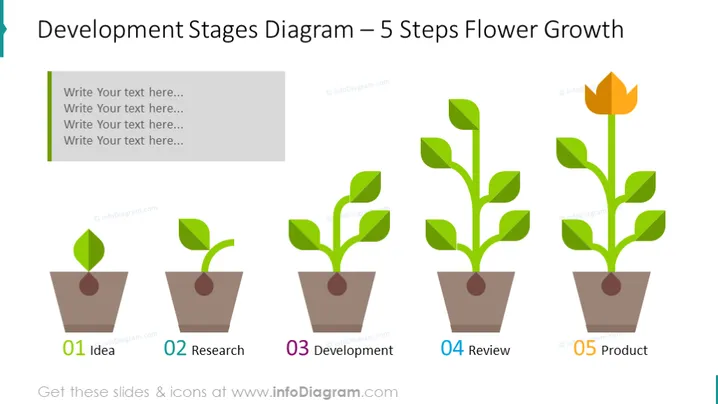
Die Folie ist mit einem 5-stufigen Blumenwachstumsdiagramm illustriert. Der erste Schritt ist eine Idee, dann Forschung, Entwicklung, Überprüfung und Endprodukt. Die wachsende Blume symbolisiert jeden dieser Schritte, um Ihrem Publikum das Thema sofort verständlich zu machen. Alle Formen sind Vektoren, sodass Sie sie nach Bedarf bearbeiten können, ohne die Qualität jedes Elements zu beeinträchtigen. Sie können die Präsentation in anderen Softwareanwendungen, wie Google Slides und Keynote, herunterladen. Klicken Sie auf das Bild, um mehr Ideen zum Geschäftswachstum und zur Entwicklung zu sehen. ## Diagramm der Entwicklungsstufen Foliengrafiken Wachsendes Pflanzen-Vektor-Illustration, Schritte Diagramm, Farbcode, Textfeld



