
Reviews
Ihre Grafiken verleihen meinen Präsentationen eine nette Note, und ich habe sie kürzlich für eines meiner All-Hands-Meetings verwendet. Ihre Toolbox verleiht meinen Folien Professionalität, anstatt Standard-Clipart zu verwenden.
Ich brauchte einen neuen Blick auf einige meiner Folien. Ich habe versucht, einen Weg zu finden, einen Pinselschlag-Effekt zu erzielen, um zu unterstreichen, hervorzuheben, Farbe hinzuzufügen, und die handgeschriebenen Markierungen waren genau das Richtige. Sehr einfach zu bedienen, leicht in der Größe zu ändern, die Farbe zu ändern. Es war eine erschwingliche, perfekte Lösung und ich empfehle sie gerne weiter.
Die klare, saubere Optik der Grafiken und die Tatsache, dass ich die Farben leicht bearbeiten und an die Vorlage anpassen konnte, war mein Hauptgrund für den Kauf.
Description
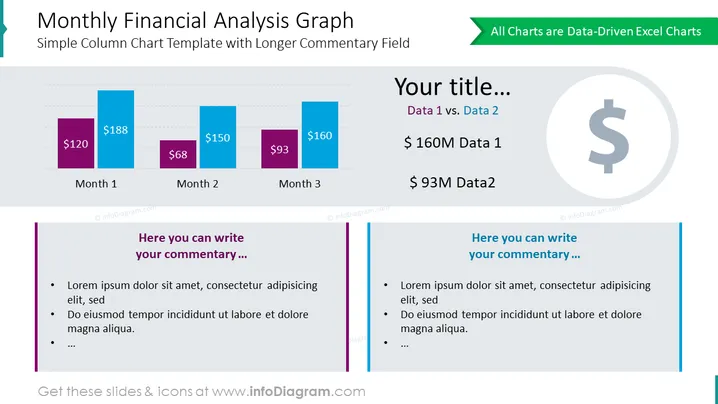
Monthly Financial Analysis Graph
Slide Content
The slide titled "Monthly Financial Analysis Graph" presents a simple column chart template designed for displaying financial data across three months. It features two columns for each month, each column indicating the respective monetary values, thus facilitating a comparison between two different sets of data. The text placeholders labeled "Your title...", "Data 1 vs. Data 2" and "Here you can write your commentary..." suggest where presenters can insert their own titles, data comparisons, and detailed commentary to explain the trends or values depicted in the chart.
Graphical Look
- Two column charts with three pairs of columns, differentiated by color (purple and blue).
- Four text boxes with varying fonts and sizes displaying the title, subtitle, data summaries, and commentary sections.
- A dollar icon inside a faded circle to the right of the slide – representing a financial theme.
- A green banner in the upper right corner indicating the data is editable in Excel.
- Horizontal dashed lines as gridlines to indicate scale on the column charts.
- Two commentary sections with sample bullet points featuring a bold vertical line for separation.
The slide is visually balanced, with a clean and professional design. The use of color helps in differentiating data and the layout is organized to guide the viewer through the slide in a logical manner.
Use Cases
- Presenting monthly revenue or expense data in a business meeting to highlight trends and comparisons.
- Visualizing financial performance over a quarter, during a quarterly business review.
- Illustrating budget variances across different months in a financial planning session.
- Showcasing sales figures or other key performance indicators (KPIs) in a management or stakeholder presentation.
How to Edit
How to edit text & colors

How to expand / shorten diagram

How to Replace Icons in infoDiagram PPT


